
X-Content-Type-Options nosniff, Stopping Uploads From Becoming Scripts
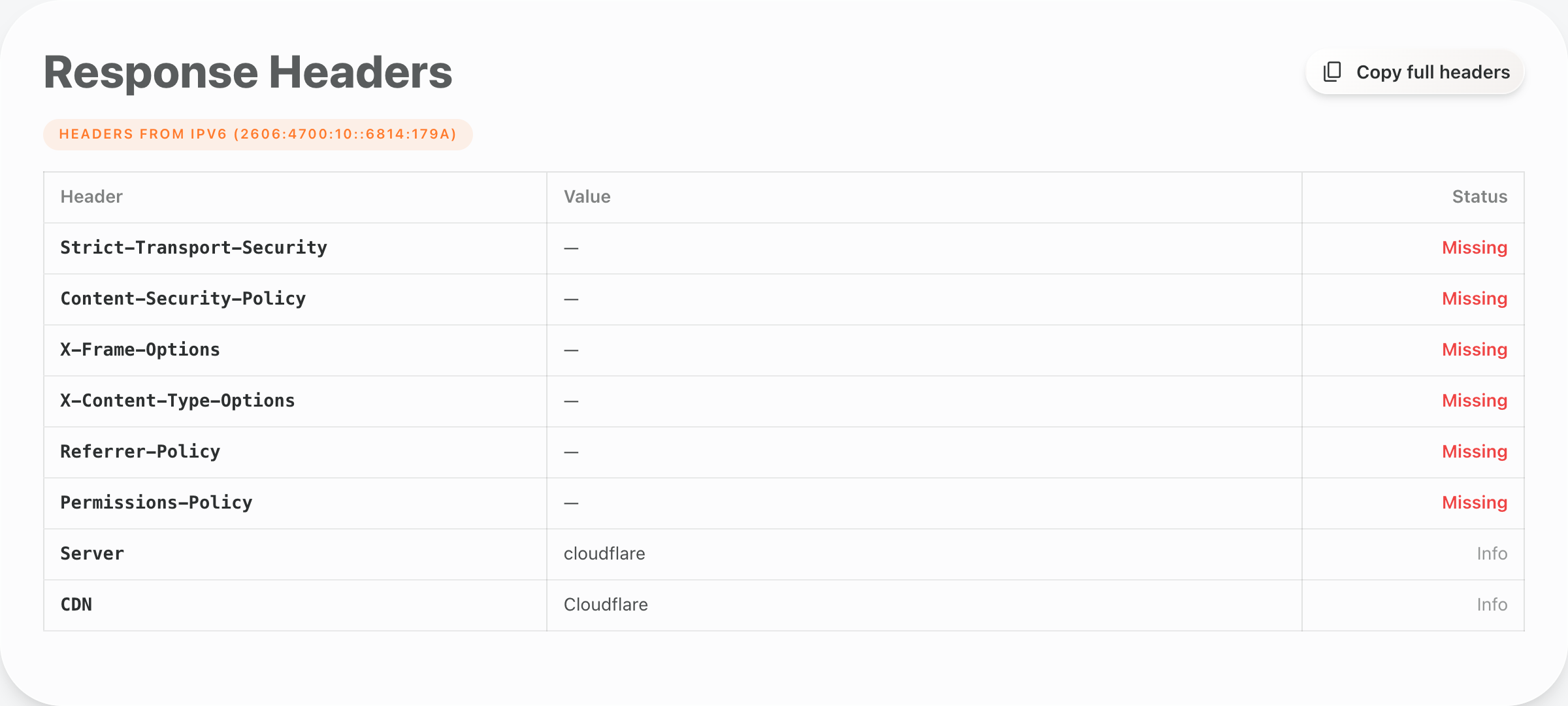
No X-Content-Type-Options. That is the flag when a site does not send the nosniff header, and it is the quietest card in the security section of an Enterramon report. It usually sits past the first three recommendations, behind the count of remaining findings, because it is low severity and it does not try to be anything bigger than it is.
The honest version is this. Nosniff never punishes a site for being absent, it only adds a little credit when it is present. The flag is a missed opportunity, not a failing, and it is also the cheapest security fix on the report. One line on most servers, essentially no downside, which makes it a strange flag to leave unfixed once you know what it is for.
When a browser guesses at a file
Every response from a server should say what kind of file it is carrying through the Content-Type header. Text becomes text/html, a script becomes text/javascript, an image becomes image/png. Old browsers had a habit of ignoring that label and guessing instead, looking at the first bytes of a file to work out what it probably was, a process called MIME sniffing.
The nosniff header tells the browser to stop guessing and trust the Content-Type the server declared. It sounds trivial, and most of the time it is, which is why the severity is low. The danger appears in a specific place. A site that lets people upload files, an attachment system, a document portal, a user-submitted image library, can end up serving an uploaded file with a missing or generic Content-Type. A browser that sniffs that response can decide the benign upload is actually an executable script, and run it in the visitor’s session. That is the attack this header exists to stop, a benign upload quietly turning into a script.
The cheapest header in the report
Most security fixes come with a trade. A Content-Security-Policy can break a page while you tune it, HSTS needs every subdomain to be HTTPS-ready first, X-Frame-Options has to be reconciled with anything that legitimately embeds you. Nosniff has none of that friction. It does not block anything a normal site does, it does not need an allowlist, and it does not care about your subdomains or your embed partners. It is a single header that tells the browser to believe the Content-Type, and that is the whole job.
Across the last 3,260 tests we ran, only 18 percent of sites send it, which puts it in the same company as the other header checks we track on the global analytics page. The gap is not because the fix is hard. It is because the header is quiet, low severity, and easy to skip while a site chases the flags that shout louder. It still leaves eight points of security credit never added, and it leaves the upload path relying on every browser choosing not to sniff.
Adding X-Content-Type-Options nosniff
On Apache or LiteSpeed, add the header in the virtual host or an .htaccess file with mod_headers enabled. LiteSpeed speaks the Apache config language, so the same line works on both.
Header always set X-Content-Type-Options "nosniff"
On nginx, the same header inside the server block with the always keyword. If any location block declares its own add_header, the line has to be repeated inside that location block too, because nginx silently drops inherited headers when a child block sets its own.
add_header X-Content-Type-Options "nosniff" always;
Behind Cloudflare, add it as a response header transform rule so the edge adds the header on responses for your domain. If you already added Strict-Transport-Security or X-Frame-Options this way, the same rule list is where nosniff belongs, and the HSTS guide shows the same pattern on all three stacks.
The trade you make when sniffing stops
Nosniff has one honest catch, and it is worth knowing before you switch it on. When the browser stops guessing, it trusts the Content-Type completely, which means a file with the wrong label no longer gets rescued by sniffing. A script served as text/plain stays text, an image served with a generic label stays unreadable. Modern servers label their assets correctly, so this rarely bites, but a legacy upload handler that never set Content-Type properly will surface its mistakes after the header lands.
That is why the check comes with its own watch note. Add nosniff, then make sure the files your site actually serves carry correct Content-Type headers. If you see a broken script or image after adding the header, the file is mislabelled and the fix is the label, not removing nosniff.
When the Missing row turns Present
You can confirm the header in a browser, no terminal needed. The server check tool shows the response headers a domain actually sends, with the security headers called out separately, so run it on your domain and look for the x-content-type-options row. Missing means the header is not there yet. Present with the value nosniff means it is live. If you prefer the terminal, curl -I https://yourdomain.com shows the same header.
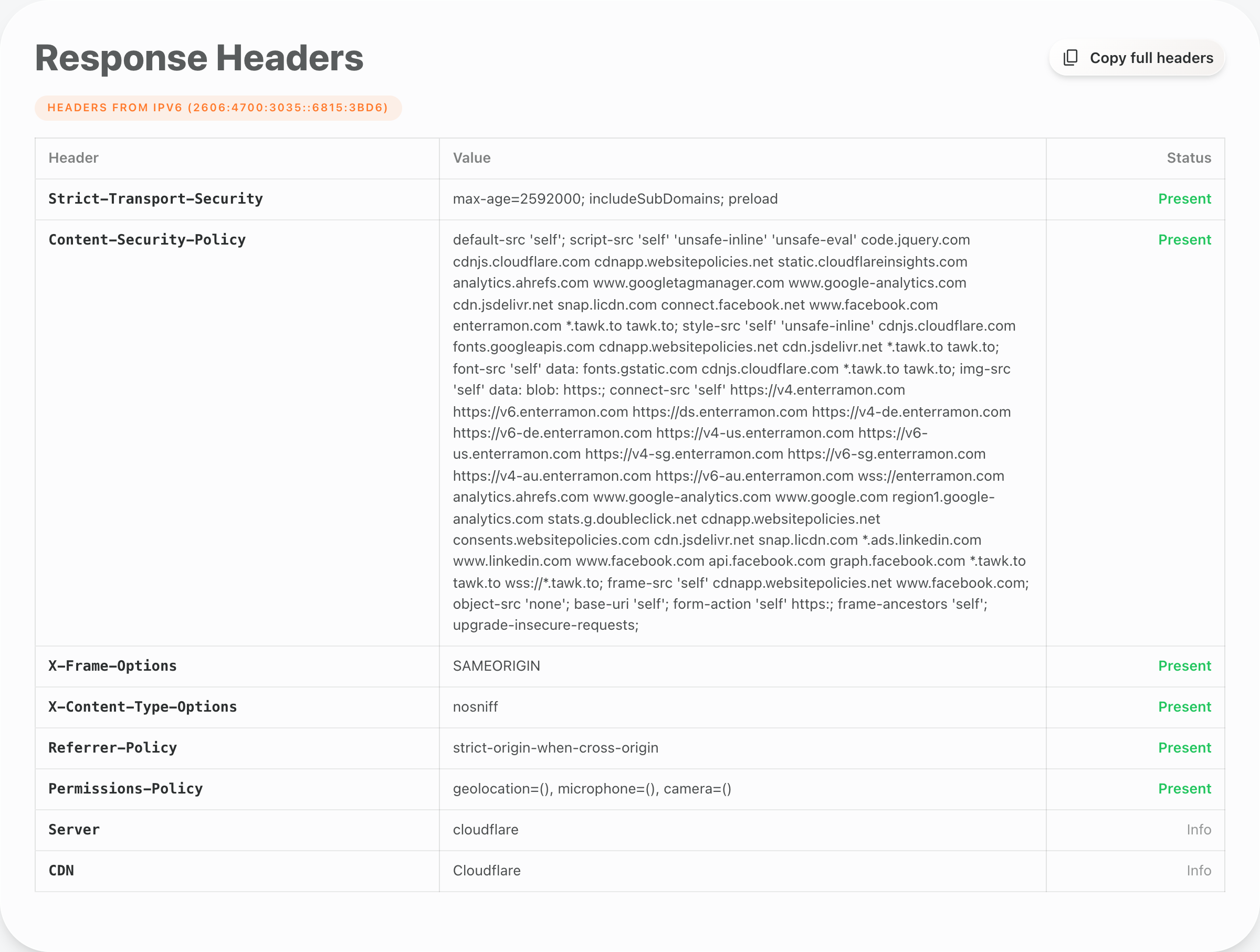
Then run another Enterramon test and the flag should clear, which adds the nosniff credit onto your security score. It is a small credit on a quiet flag, but the header is also one of those fixes that compounds, because the same server block that carries nosniff usually carries the other security headers, and clearing them together is what moves the score properly.
