
HSTS Not Enabled, and Why That Leaves Your Visitors Open to Downgrade Attacks
HSTS not enabled, high severity. That is the flag when a site does not send the Strict-Transport-Security header, and it is one of the most common ones we see. Our own numbers show why. Across the last 3,255 tests we ran, only 38 percent of sites send the header at all. The other 62 percent, including plenty of sites with otherwise healthy security scores, simply never turn it on.
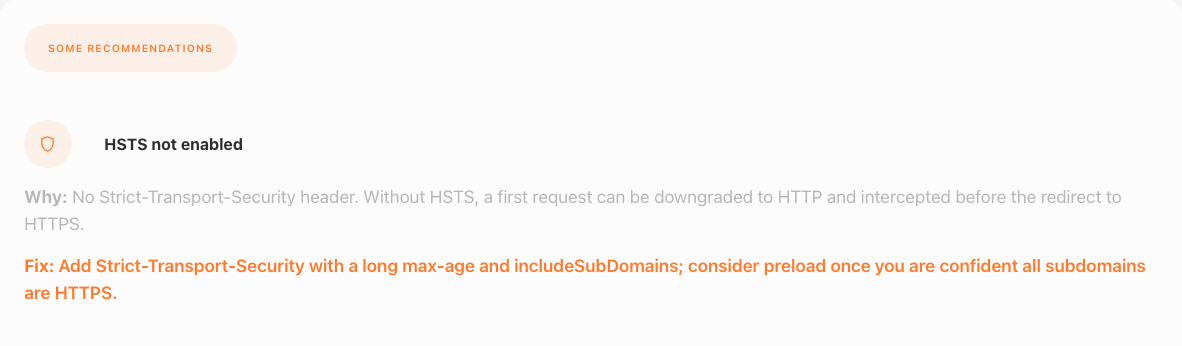
This is what the flag looks like in a real report. The card carries the severity, the reason the check fired, and the fix in plain language, and the same shape appears whether you ran a free test or a scheduled Enterramon Pro report.

The security score sits in the middle of the report’s score row, and a missing HSTS header means fourteen points of security credit never get added. Fix the header and that credit lands on the next test, which is a faster win than most of the other security flags.
The header, the rule, and the first visit
Strict-Transport-Security tells the browser to only ever talk to your site over HTTPS, and to remember that instruction for a set period. The header carries a max-age in seconds, and once a browser has seen it, it will not make a plain HTTP request to that domain again for the life of that window. Type the address without the https and the browser silently upgrades it anyway.
One rule matters when you configure it. Browsers ignore the header entirely when it arrives over plain HTTP, so it has to be served on the HTTPS response, not on the redirect that bounces visitors from http to https. Put it on the encrypted response and it works. Put it on the redirect and it does nothing.
That matters because of the moment before the lock icon appears. A browser that has never visited your site does not know you support HTTPS, so the first request goes out as plain HTTP, and that first request is the one an attacker on the same network can intercept and redirect. HSTS closes that window after the first visit. It does not make the first request safe, it makes every request after it refuse to downgrade.
Not a ranking factor, and never will be
This is where we part ways with the typical SEO audit. Most SEO tools look at keywords, backlinks, meta tags, and page speed, and call it a day. Security headers rarely appear in them, because headers are not a ranking factor and never will be. They are not about how Google sees you. They are about what happens to a visitor who hits your site from a coffee shop wifi or a hotel network, and that is a network conversation, not a search one.
We come at this from the network side, and the reason goes back further than this company. The people behind Enterramon and Enterrahost have spent more than thirty years combined in ISP networks, network security, and hosting, and that experience predates both brands. The security layer is not an afterthought bolted onto an SEO report. It is where we started. When your Enterramon report shows HSTS missing, it is not a suggestion from a marketing checklist, it is a real gap in how your site behaves on the open internet, and it is the kind of gap a ranking tool will never tell you about.
The downgrade attack, in plain terms
Imagine a visitor on public wifi types your domain or clicks a link that points at the http version. Without HSTS, that request travels in clear text, and anyone on that network can read it or swap what comes back. Tools like sslstrip do exactly this, quietly rewriting https links to http so the browser never encrypts in the first place. The visitor thinks they are on your site. They are on a copy the attacker controls.
HSTS is the counter. Once the browser has seen the header, it refuses the plain HTTP version outright and goes straight to HTTPS. The downgrade has nothing to downgrade to. That is the whole value, and it is why the header belongs on every site that has a certificate, which at this point should be every site.
There is a mechanical difference worth understanding between a normal redirect and HSTS. A plain http to https redirect is a server round trip, the browser asks for the http address, the server answers with a redirect, and only then does the browser go to https. That round trip is exactly where sslstrip works its magic. HSTS skips it. The browser sees the header once, remembers the rule, and rewrites the request to https inside itself before any packet leaves the machine. No round trip means no window for the strip.
Adding Strict-Transport-Security on Your Server
The header itself is one line, but the rollout has stages and the order matters. Unlike some security headers, HSTS has no report-only mode, so the way to test safely is a short max-age that expires fast. Start at five minutes, check the site still behaves, step up to a day, then a week, then a year. Each stage exists because HSTS mistakes are hard to walk back, and preload is the hardest of all.
On Apache or LiteSpeed, the header goes in the virtual host or an .htaccess file with mod_headers enabled.
Header always set Strict-Transport-Security "max-age=31536000; includeSubDomains"
On nginx, the same header inside the server block, with the always keyword so it survives error responses and redirects. If you run several sites, keep it in one snippet file and include it from each server block.
add_header Strict-Transport-Security "max-age=31536000; includeSubDomains" always;
One nginx trap to know about. If any location block inside your server config declares its own add_header directive, nginx silently drops the inherited ones from the server block, so a PHP, API, or static-asset location that sets its own header stops sending HSTS on those responses. When a location block has its own add_header, the HSTS line has to be repeated inside that location block too, or the requests it handles go out without the policy.
Behind Cloudflare, the cleanest route is the native HSTS toggle under SSL/TLS and Edge Certificates, which sets the header and handles the redirect side at the edge. If you would rather use a transform rule, make sure it applies to HTTPS requests, since a header set on a plain HTTP response is ignored anyway. Many hosts and security plugins expose an HSTS toggle too, which is fine as long as you can see what max-age and subdomain policy it actually sets.
The preload warning
The header only protects browsers that have visited your site before. Preload closes the gap for the very first visit by shipping your domain in a hardcoded list inside the browser itself, so HSTS applies before anyone ever lands on you. That sounds strictly better, and it is, until you want to undo it.
Removing a domain from the preload list is a slow process measured in months and browser release cycles, so the decision needs to be made once and made carefully. The same caution applies to includeSubDomains on its own. That directive forces HTTPS on every subdomain, and if any of them is not genuinely HTTPS-ready, visitors get hard-blocked from it with no way through. Hosting panels make this trap easy to walk into, because cPanel and similar control panels hand out subdomains automatically, cpanel.yourdomain.com, webmail.yourdomain.com, mail.yourdomain.com, and some of those services still listen on plain HTTP ports. The day includeSubDomains goes live, any one of them without a working certificate becomes unreachable, and the fix is not quick.
Only add includeSubDomains once every subdomain you care about is genuinely HTTPS-ready, which means checking the automatic panel subdomains, not just the site itself. Treat any preload submission as a point of no return. For most sites, a long max-age without preload is enough, and preload can wait.
Seeing the header on your own site
You can see the header in a browser, no terminal needed. The server check tool returns the headers a domain actually serves, each security header on its own row, so find the strict-transport-security line and check the max-age and subdomain policy against what you intended. If you prefer the terminal, curl -I https://yourdomain.com shows the same headers, and the strict-transport-security line is the one to read.
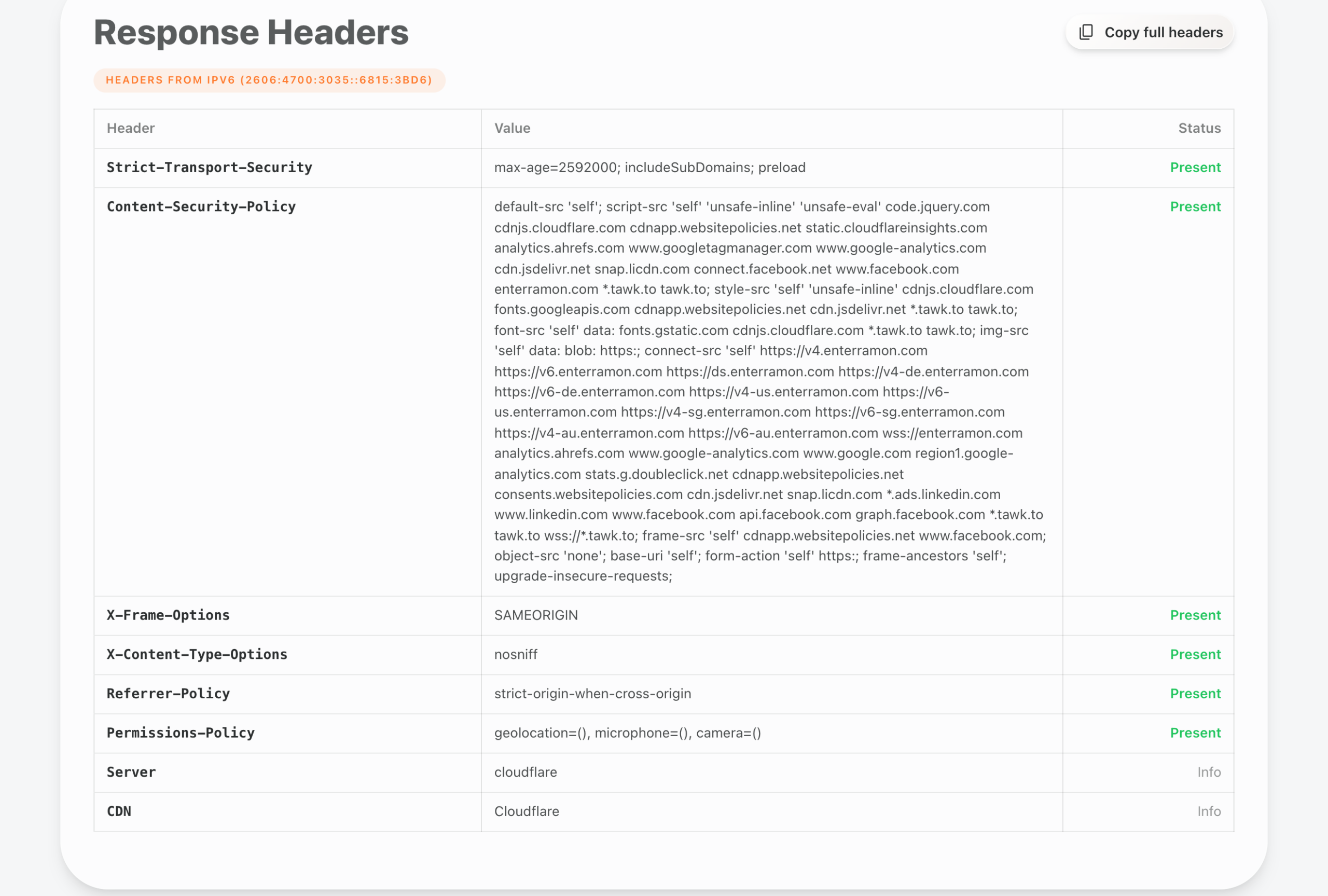
Then run another Enterramon test and the flag should clear, which adds the HSTS credit onto your security score. The other header checks tend to clear around the same time, because the same config work usually fixes several of them at once, and a missing Content-Security-Policy is usually sitting right next to this one in the same report.
If your report flagged that too, the missing Content-Security-Policy guide walks through adding it on the same stacks, in report-only mode first so nothing breaks.
If you want to see how your site compares against the wider web, the global analytics page tracks the share of tested sites sending HSTS, valid SSL, and the other security signals we measure. It updates from real tests, and right now only 38 percent of sites carry the header, so adding it genuinely puts you ahead of most of the internet.
